

From Insight to Action: A Guide to LabStats Insights
July 8, 2026 | LabStats Insights
10 min
Higher education IT teams are not short on data.
Across campus labs, libraries, classrooms, virtual environments, and shared technology spaces, there is a constant stream of information about how devices and software are being used. Which computers are active. Which applications are in demand. Which machines are sitting idle. Which devices may need attention. Which risks could become bigger problems if they are not reviewed.
The challenge is not always collecting the data. The challenge is knowing what deserves attention first.
That is where LabStats Insights comes in.
LabStats Insights helps higher education IT teams move from reporting to action by surfacing automated reports, alerts, and recommendations at your desired frequency. Instead of relying only on manual report reviews, teams can see where there may be an opportunity to optimize resources, improve visibility, reduce waste, or address potential risks.
In other words, LabStats Insights helps turn campus IT data into clearer next steps.

What is a LabStats Insight?
A LabStats Insight is one automated report, alert, or recommendation that highlights something worth reviewing.
Each Insight presents a focused finding with supporting context and a clear action path. It might point to computers that appear inactive, devices that are not assigned correctly, applications that could be deployed more effectively, or machines that may need attention due to storage, operating system, or crash-related issues.
Each Insight is designed around a specific question or challenge. For example:
- Which computers may not be meaningfully used?
- Which devices are missing important assignment data?
- Which applications could be eliminated, virtualized, consolidated, or expanded?
- Which computers may have been missed during Windows 11 upgrade projects?
- Which devices may need attention before health issues become service issues?
By focusing on specific areas of opportunity or risk, each LabStats Insight helps quickly show what may need review and where action may be needed.
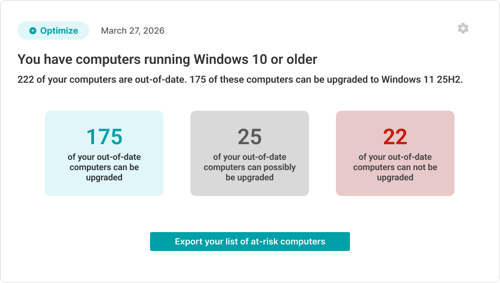
Windows 11 Compatibility Insight
Watch LabStats Insights in action in our demo webinar!
Join us for an introduction to LabStats Insights, a new way to surface automated reports, alerts, and recommendations through the Insights Feed and email alerts. Instead of relying on teams to manually search through reports, LabStats Insights helps bring relevant opportunities, risks, and actions to the people who need to see them.
We’ll explain what a LabStats Insight is, how multiple Insights come together, and how the Measure, Optimize, and Assure tiers reflect the wider LabStats journey. You’ll also see LabStats Insights in action, with examples of how individual Insights can help IT teams identify inactive computers, improve inventory accuracy, review software deployment opportunities, find computers that may have been missed during Windows 11 upgrade projects, and stay ahead of device health risks.
Whether you are exploring LabStats for the first time or looking to get more value from your existing LabStats environment, this session will show how LabStats Insights can help higher education IT teams move from manual reporting to more proactive, evidence-based decision-making.
A Clearer Way to Understand Your Environment
While a LabStats Insight refers to one individual automated report, the wider collection of Insights available within LabStats offers a more comprehensive view across your technology environment. There are currently eight LabStats Insights, with more being added over time.
Together, these Insights help institutions identify patterns, gaps, risks, and opportunities across devices, software, usage, and health. They support a more proactive approach to managing campus technology by making important signals easier to find.
That matters because higher education IT environments are complex. Devices may be spread across multiple campuses, buildings, labs, departments, and user groups. Software may be installed in more places than needed, or not available where demand is growing. Some computers may sit unused. Others may be showing early signs of health issues that have not yet turned into support tickets.
LabStats Insights helps bring those signals into view.
It gives you a clearer way to understand what is changing across your environment, so decisions around planning, usage, device health, and resource allocation can be made with greater confidence.
Introducing the Insights Feed
The Insights Feed is where LabStats Insights are surfaced.
Think of it as a newsfeed-style experience inside LabStats, designed to bring forward the important changes, patterns, and findings that may need attention. Instead of asking you to sift through multiple reports to understand what matters, the Feed brings those moments directly to you.
It gives you a central place to review automated reports, alerts, and recommendations across usage, software, devices, and health. The Feed is designed to help show what may need attention without losing the broader context of your environment.
Reporting is valuable, but reports often require time, interpretation, and manual follow-up. The Insights Feed helps make that process more focused by bringing forward specific items that may deserve review.
This does not replace the need for IT judgment. Instead, it gives you a better starting point.
The Feed helps answer a practical question:
Where should we look next?
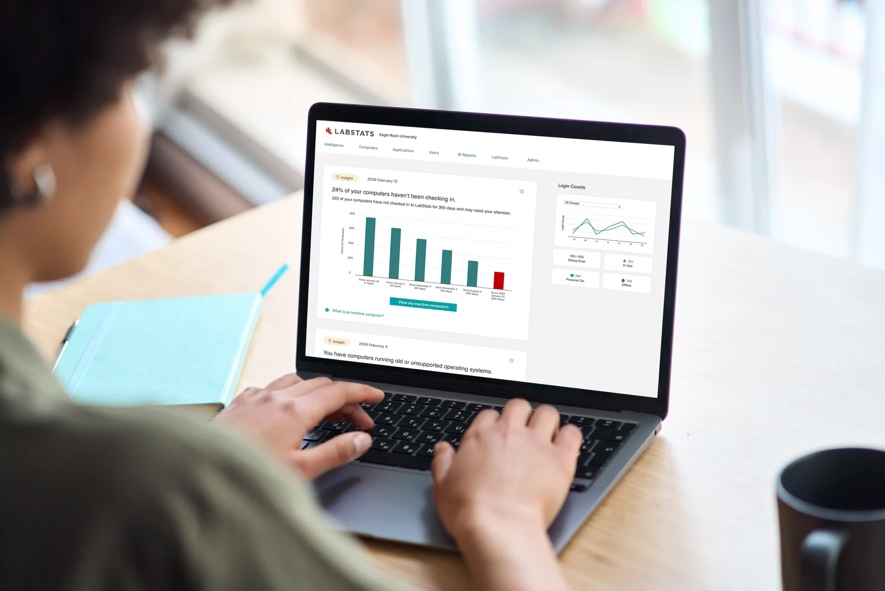
Insights can also be supported through email notifications, helping users stay informed without needing to check manually every time. Depending on the LabStats tier available to the account, users can configure the frequency of individual Insights, including how often they appear in the Feed or are delivered through email notifications.
The Feed is also designed to stay relevant. When the conditions for an Insight are met, the Insight can be surfaced for review. If those conditions are not met, the Feed does not need to create unnecessary noise. That helps keep attention focused on the areas where there may be something useful to investigate.
When an Insight appears, it can guide you toward the next step, such as reviewing a filtered report, opening the relevant list of devices, or exporting information for follow-up. That is what makes the Feed more than a place to view information. It becomes a starting point for action.
From Insight to Action
More data is not always the answer.
Sometimes what matters most is context, timing, and the confidence to know what to do next.
Some problems announce themselves loudly. Others sit quietly in the background. A computer that is rarely used may still look like part of the available estate. An application may remain deployed long after demand has changed. A device running an older operating system may not create an immediate issue, but it can still introduce risk, inconsistency, or support complexity. A machine with recurring crashes may only become visible once users begin reporting the problem.
These are the kinds of issues that are easy to miss when they are buried inside reports, spread across locations, or hidden among hundreds or thousands of devices.
LabStats Insights helps surface them earlier.
It acts like an extra set of eyes on your environment, bringing attention to the places where usage, cost, health, access, or risk may need a closer look. That could mean reviewing inactive computers, improving device assignment, understanding software usage, identifying potential savings, spotting upgrade gaps, or finding health issues before they become bigger service problems.
For colleges and universities, this visibility matters. Labs and classrooms need to remain dependable throughout the academic year. Software access needs to align with student and academic demand. Operating system and hardware lifecycles need to support teaching, learning, budgeting, and planning cycles.
LabStats Insights helps create the clarity needed to manage those responsibilities with less manual investigation.
The goal is not to overwhelm you with more data. It is to make the right signals easier to see.
So instead of asking:
“Which reports should we check?”
You can start asking:
“What needs our attention?”
That is the move from insight to action.

The LabStats Journey: Measure, Optimize, Assure
LabStats Insights are organized across three LabStats tiers:
Measure. Optimize. Assure.
That structure tells a simple story.
Before you can improve anything, you need to understand it. Before you can reduce waste, improve access, or plan with confidence, you need visibility into what is happening across your environment. That is the role of Measure.
Once you can see what is happening, the next step is deciding where things could work better. Where are resources underused? Where is software deployed in a way that no longer matches demand? Where might devices need to be reviewed, reallocated, or investigated? That is the role of Optimize.
And once resources are better understood and better aligned, the focus expands to assurance. Which issues could affect service quality? Which devices may be showing signs of risk? Which problems can be identified before they become disruption? That is the role of Assure.
Together, these tiers create a journey from visibility, to improvement, to confidence.
Measure what is happening. Optimize what can be improved. Assure the experience.
Which Insights Are Available in Each Tier?
Every LabStats Insight belongs to a specific tier. This helps organize each Insight around the type of value it provides and the stage of the journey it supports.
It also means that the Insights available within an account depend on the LabStats tier that account has access to. For existing customers, this creates a clear path to broaden what can be surfaced, configured, and reviewed as needs grow.
Measure
The Measure tier focuses on foundational visibility. It helps you understand what is happening across your environment before making decisions about what should change.
Current Measure Insights include:
- Inactive Computers Insight
- Unassigned Computers Insight
These Insights help improve visibility into device activity and inventory accuracy, making it easier to build confidence in reporting and planning. They support the first stage of the journey by helping reveal where the current picture may be incomplete, unclear, or worth reviewing.
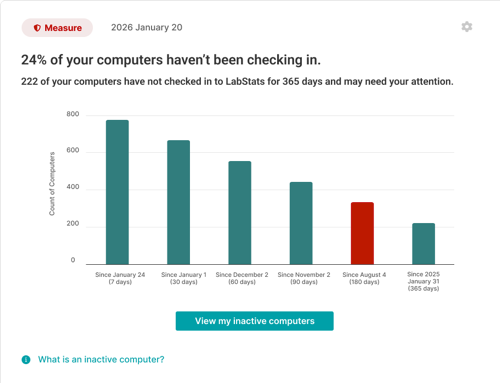
Inactive Computers Insight
Optimize
The Optimize tier focuses on improving how resources are allocated, deployed, and used. Once you can see what is happening, Optimize Insights help identify where change may create better outcomes.
Current Optimize Insights include:
- Application Deployment Optimization Insight
- Windows 11 Compatibility Insight
- Zero Login Computers Insight
These Insights help review software deployment, identify devices that may have missed Windows 11 upgrade activity, and surface computers that show no login activity. They support decisions around resource allocation, cost savings, software access, device usage, and upgrade planning.
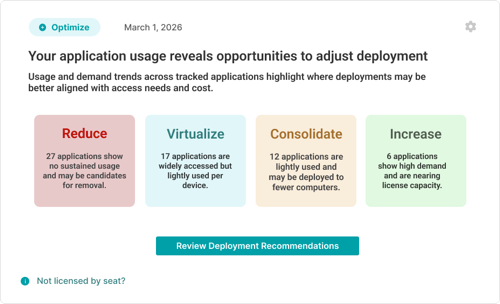
Application Deployment Optimization Insight
Assure
The Assure tier focuses on proactive health, reliability, and risk visibility. It helps surface issues that could affect users, service quality, or technology continuity before they become wider problems.
Current Assure Insights include:
- Low Storage Space Insight
- Old OS Insight
- Windows Crash Report Insight
These Insights help identify device health, operating system, and crash-related issues that may need attention. They support a more proactive approach to service assurance by helping you find risks earlier and respond with more confidence.
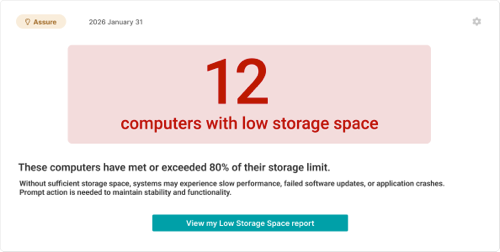
Low Storage Space Insight
What to Expect as LabStats Insights Grows
This is just the beginning.
LabStats Insights is designed to keep expanding, with new Insights continuing to appear as more opportunities, risks, and use cases are identified. Each new Insight adds another way to turn LabStats data into meaningful direction.
As the Insights library grows, the goal remains the same: to help surface the signals that matter and make them easier to act on.
Some future Insights will help strengthen visibility. Some will support better optimization. Others will help protect reliability, service quality, and assurance. Together, they will continue to build a clearer picture of what is happening across your technology environment and where attention may be needed next.
As more individual Insight resources become available, they will explore each use case in more depth, from inactive computers and inventory accuracy to software deployment, upgrade gaps, device health, outdated operating systems, and crash patterns.
Get Started
LabStats Insights helps higher education IT teams surface the signals that matter across devices, software, usage, and health.
Whether you are looking to improve visibility, identify cost-saving opportunities, review device usage, strengthen planning, or stay ahead of potential risks, LabStats Insights can help you understand where attention may be needed.
To see how LabStats Insights can support your institution, get started by booking a demo.
Work With Us
LabStats specializes in helping IT leaders reduce spend and get their budgets right.
