

What Zero Logins Can Reveal
October 13, 2026 | LabStats Insights
5 min
A computer can be powered on and still not be useful.
It may be sitting in a lab with a missing keyboard. It may be in a location students rarely choose. It may have a display issue, a login problem, or a hardware fault that stops people from using it. It may be available in theory, but ignored in practice.
That is what makes zero-login computers so important to understand.
Unlike a computer that has gone completely inactive, a zero-login computer is still powering on. It is present. It is reporting. It looks like part of the available estate. But if no one is logging in, something may not be working as intended.
For colleges and universities managing labs, libraries, classrooms, and shared learning spaces, that distinction matters. A powered-on device with no user activity may be a sign of wasted energy, poor placement, access barriers, hardware issues, or an opportunity to move resources where demand is stronger.
Zero logins can reveal more than unused computers. They can reveal where access, experience, and resource planning may need a closer look.
Why Powered-On but Unused Computers Matter
In shared computing environments, availability is not just about whether a computer is switched on.
A computer may be powered on every day, but if no one logs in, it is not helping students complete coursework, access specialist software, or use the space effectively. It is taking up room, consuming power, requiring maintenance, and remaining part of planning assumptions without necessarily delivering value.
That can create several challenges.
A lab may appear well equipped because machines are powered on, even though some devices are not being used. A shared space may seem to have enough capacity, while actual user behavior points elsewhere. A device may remain in place because no one has visibility into the fact that it has not supported a login in weeks or months.
Over time, powered-on but unused computers can distort how you understand demand.
They can make it harder to answer questions such as:
- Are students actually using the computers available to them?
- Are some devices in poor locations?
- Are machines being avoided because of hardware or access issues?
- Are resources sitting unused while other spaces experience higher demand?
- Could some devices be moved, fixed, repurposed, or decommissioned?
Zero-login computers may not always indicate a problem. But they do indicate something worth reviewing.
How Zero Logins Can Reveal Waste, Access Issues, or Misallocation
A zero-login computer tells a specific story: the device had power activity, but no one logged in.
That pattern can point to several different causes.
The computer may be in the wrong place
Location matters. A computer may be technically available but placed somewhere that students rarely choose to work. It may be in a room with lower foot traffic, a lab with limited opening hours, or a space that no longer matches current demand.
If users consistently ignore certain computers, it may be worth asking whether those devices would create more value somewhere else.
The computer may be difficult or impossible to use
A powered-on device with no logins may have an issue that makes it less accessible.
It could be missing peripherals, have a faulty monitor, experience login problems, or have hardware issues that discourage use. In these cases, zero-login data can help point attention toward computers that may need physical inspection or support follow-up.
The computer may no longer be needed
Some devices stay in place because they have always been there.
But academic needs change. Software demand changes. Students use spaces differently. Departments move. Labs are reconfigured. A computer that once supported meaningful demand may no longer be necessary in its current location.
Zero-login patterns can help identify devices that may be candidates for review, reallocation, or decommissioning.
The computer may be creating a false sense of availability
If a machine is powered on but never used, it may still be counted as available capacity in planning discussions.
That can be misleading.
For example, a room with 40 powered-on computers may look healthy on paper. But if several of those machines have no login activity over a long period, the real picture may be different. Some resources may not be contributing to access, even though they appear to be available.

What Is a Zero-Login Computer?
A zero-login computer is a computer that has been powered on during a selected time period but has had no login sessions during that same period.
This is different from an inactive computer.
An inactive computer has stopped reporting in. A zero-login computer is still showing power activity, but no user activity.
That difference is useful because it helps separate two different questions:
Inactive computer: Is this device still checking in at all?
Zero-login computer: This device is powered on, so why is no one using it?
The second question can reveal a different set of issues. The machine exists, is powered, and is present in the environment. But if users are not logging in, there may be a reason worth investigating.
Why Do Computers Have Zero Logins?
Computers can have zero logins for many reasons. Some are expected. Others may indicate a problem.
Common causes include:
- The computer is in a low-demand area.
- The device is in an inconvenient or hard-to-find location.
- The computer is missing a keyboard, mouse, monitor, or other peripheral.
- The device is not functioning properly.
- Users are choosing nearby computers instead.
- The machine is powered on for maintenance or availability but not needed.
- The computer supports a specialist use case that was not active during the selected timeframe.
- The device is no longer required in that location.
- The machine has access, login, or configuration issues that discourage use.
The right interpretation depends on context.
A zero-login computer in a specialist lab during a quiet academic period may not be concerning. A zero-login computer in a high-demand student space may deserve faster investigation. A group of zero-login computers in the same location may point to a broader access, placement, or configuration issue.
How to Identify Zero-Login Computers
To identify zero-login computers, you need to compare power activity with login activity over a meaningful timeframe.
Useful signals include:
- Whether the computer existed during the full reporting interval
- Whether it was powered on during that interval
- Whether any login sessions occurred during that interval
- Whether the computer currently has an active login session
- How many days have passed since the last login
- Which group, lab, or location the computer belongs to
- Whether similar nearby devices are being used
- Whether the computer is in a high-demand or low-demand area
The timeframe matters.
A computer with no logins over seven days may simply reflect a quieter week. A computer with no logins over 90, 180, or 365 days may tell a much stronger story. The longer the gap between power activity and login activity, the more likely it is that the device deserves review.
It can also be helpful to look for patterns.
One zero-login computer may be a device-level issue. Several zero-login computers in the same area may point to a location, access, signage, hardware, or demand problem. A recurring pattern across terms may suggest that the device estate no longer matches how students use the space.
What Should You Do When You Find Zero-Login Computers?
Finding zero-login computers is the starting point. The next step is to understand why they are not being used.
Common follow-up actions include:
- Checking whether the computer is functioning correctly
- Confirming that required peripherals are present and working
- Reviewing whether the device is in a convenient location
- Comparing usage with nearby computers
- Checking for login, configuration, or access issues
- Reviewing whether the computer supports a specialist use case
- Considering whether the device should be relocated to a higher-demand area
- Deciding whether the computer should be decommissioned
- Exporting the affected device list for follow-up or investigation
The goal is not to remove every computer with zero logins.
The goal is to understand the reason behind the pattern.
Some devices may need support. Some may need to move. Some may need to be retained for a specific academic purpose. Others may no longer be needed. With the right information, those decisions become easier to make and easier to explain.

How LabStats Zero Login Computers Insight Helps
The Zero Login Computers Insight helps identify computers that have been powered on but have not had any login sessions during a selected time interval.
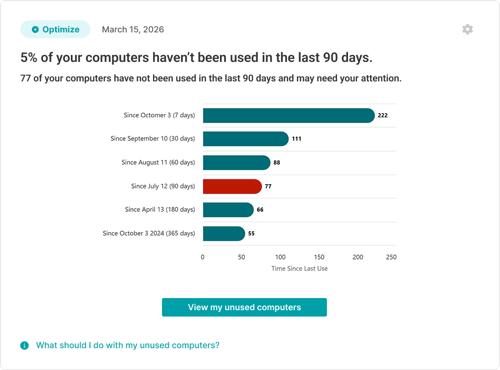
Instead of manually comparing power activity and login activity across devices, the Insight brings the issue forward in the Insights Feed when one or more computers meet the criteria. It helps show how many computers have gone unused and how long they have been without login activity.
The Insight uses time buckets, such as 7 days, 30 days, 60 days, 90 days, 180 days, and 365 days, to make the pattern easier to understand. A highlighted threshold helps show which group of computers may require action based on your selected settings.
When you select View my unused computers, LabStats opens a report listing the computers that match the Insight. The report includes details such as computer name, group, hostname, manufacturer, model, operating system, days since last login session, last seen date, and last login activity date. You can export the report to review or investigate each computer.
The Zero Login Computers Insight can help answer practical questions such as:
- Which computers were powered on but not used?
- How long have those computers gone without login activity?
- Are unused computers concentrated in specific groups or locations?
- Could some machines be inaccessible, inconveniently located, or experiencing issues?
- Should any devices be fixed, moved, repurposed, or decommissioned?
- Are there opportunities to reallocate hardware to higher-demand areas?
The Insight can also support notification workflows. Users can choose how often the Insight runs and can configure the inactivity threshold that determines when computers should be flagged for action, depending on the LabStats tier available to the account. Email notifications can be sent when zero-login computers are detected, and no email is sent when no computers meet the criteria.
The value is simple: powered-on but unused computers become easier to find, review, and act on.
Zero Login Computers Insight
How this connects to LabStats Insights
The Zero Login Computers Insight is part of the wider LabStats Insights experience.
LabStats Insights helps surface automated reports, alerts, and recommendations inside the Insights Feed, giving you a clearer way to understand what needs attention across devices, software, usage, and health.
If you are new to LabStats Insights, start with From Insight to Action: A Guide to LabStats Insights for a broader overview of how the Insights Feed works and how individual Insights help turn campus IT data into clearer next steps.
You may also find these related resources helpful:
- Four Actions for Smarter Software Deployment, for understanding how usage evidence can support better optimization decisions.
- Why Inventory Accuracy Matters, for understanding how group assignments support better reporting and software deployment analysis.
- The Hidden Cost of Inactive Computers, for understanding how devices that stop checking in can affect visibility, planning, and operational confidence.
- LabStats Hardware Management, for understanding how LabStats supports endpoint visibility and hardware tracking across campus.
- Optimize Labs & Learning Spaces, for guidance on using LabStats data to understand device usage, underused resources, and student access.
See LabStats Insights in action
Zero-login computers are one example of a wider challenge: important signals can be easy to miss when they are spread across devices, locations, reports, and planning conversations.
In our webinar, From Insight to Action: How Higher Ed IT Can Move from Reporting to Proactive Decisions, we explore how LabStats Insights helps surface those signals through the Insights Feed.
Watch on demand to see how LabStats Insights can help you identify what needs attention across devices, software, usage, and health.
Get Started
Powered-on computers should support real access, real usage, and real demand.
The Zero Login Computers Insight helps bring unused devices into view, giving you a clearer way to investigate access issues, reallocate resources, and make more confident decisions about shared campus technology.
To see how LabStats Insights can support your institution, get started by booking a demo.
Work With Us
LabStats specializes in helping IT leaders reduce spend and get their budgets right.
