


Four Actions for Smarter Software Deployment
September 15, 2026 | LabStats Insights
5 min
Software deployment decisions are rarely simple.
A college or university may need to support hundreds of applications across labs, libraries, classrooms, specialist teaching spaces, and shared devices. Some applications are essential every day. Some are only needed by certain courses, departments, or student groups. Others remain installed long after demand has changed.
Over time, software estates can become difficult to interpret.
An application may be installed everywhere but rarely used. Another may be installed in too many locations, adding management overhead without improving access. A specialist tool may only be needed in a handful of rooms. A high-demand application may reach capacity when students need it most.
Without clear usage evidence, software deployment decisions can easily become based on assumptions, historic installs, renewal habits, or the fear of removing access that someone might need.
That is where a more thoughtful approach is needed.
Smarter software deployment is not just about reducing applications. It is about understanding where software is needed, where access could be delivered differently, where installs can be consolidated, and where demand may justify more capacity.
Why Software Deployment Decisions Are Difficult
Software deployment has to balance access, cost, performance, support, licensing, and user experience.
In higher education, that balance can be especially challenging. Demand can change by semester, academic program, assignment cycle, or teaching requirement. Some applications are needed heavily for short periods. Others are installed broadly because it is easier than predicting exactly where they will be used.
This can create several common challenges:
- Applications remain installed long after usage has dropped.
- Software is deployed across more devices or groups than demand requires.
- Specialist applications are maintained in locations where they are rarely opened.
- Some applications reach peak demand during busy periods.
- Renewal and budgeting conversations happen without enough usage evidence.
- IT teams spend time maintaining deployments that may not reflect current need.
The result is a software environment that may be functional, but not necessarily efficient.
Software may be available, but not always in the right way. It may be accessible, but not always aligned to demand. It may be licensed, installed, and maintained, but not always delivering the value expected from it.
Why Usage Evidence Matters
Software decisions become easier when they are grounded in evidence.
Usage data can help show which applications are genuinely needed, which are rarely touched, which are installed too broadly, and which may create access pressure during peak periods. It can help move conversations away from opinion and toward observed behavior.
This matters for both cost and access.
A rarely used application may represent an opportunity to reduce waste or rethink deployment. A widely installed but lightly used application may be better delivered on demand. A specialist application may not need to be installed everywhere if usage is concentrated in specific spaces. A high-demand application may need more capacity if users are regularly approaching limits at peak times.
Usage evidence also helps support renewal conversations. Even when software is not licensed by seat, usage and peak demand can provide a practical benchmark for planning, budgeting, and vendor discussions.
That is important because many institutions use different licensing models, including site licenses, concurrent agreements, or full-time equivalent pricing. In those cases, the question is not always, “How many seats do we need?” It may be, “Where is demand real, where is it light, and how much capacity do we effectively need to support access?”

What Application Usage Can Reveal
Application usage data can reveal more than whether a piece of software was opened.
When viewed across devices, groups, and timeframes, it can help show whether deployment matches real demand.
For example:
- An application with no sustained usage may be a candidate for removal.
- An application installed across many groups but used lightly at peak may be a candidate for virtualization or on-demand delivery.
- An application used in only a few locations may be better consolidated into the spaces where demand exists.
- An application with peak usage close to available capacity may need review to protect access.
- An application with steady usage and no concerning pattern may simply need no action.
This is where software usage becomes more than reporting. It becomes a practical input into deployment strategy.
It helps answer questions such as:
- Are we maintaining applications that no one is using?
- Are we installing software more broadly than demand requires?
- Could some applications be delivered through virtualization or on-demand access?
- Are there locations where software should be concentrated instead of spread out?
- Are users at risk of being blocked during peak demand?
- Do we have evidence to support renewal, budget, or standardization conversations?
Four Actions for Smarter Software Deployment
A useful way to review software deployment is to group decisions into four possible actions:
Eliminate. Virtualize. Consolidate. Increase.
These actions help turn usage evidence into a clearer decision path.
1. Eliminate
If an application shows no usage across a sustained period, it may be a candidate for removal.
This does not mean software should be removed without review. There may be academic, contractual, accessibility, or operational reasons to keep an application available. But zero sustained usage is a strong signal that the application deserves investigation.
The key question is:
Is this software still needed where it is currently deployed?
If the answer is no, eliminating unused applications can help reduce waste, simplify management, and remove unnecessary deployment overhead.
2. Virtualize
Some applications are installed broadly but used lightly.
That pattern can suggest that access is still needed, but widespread installation may not be the most efficient delivery method. In these cases, virtualization or on-demand delivery may be a better fit.
Instead of maintaining an application across large numbers of devices, the institution may be able to deliver it when and where it is needed through solutions such as AppsAnywhere or virtual desktop infrastructure.
The key question is:
Does this application need to be installed everywhere, or does it simply need to be available when users need it?
Virtualization can help maintain access while reducing deployment footprint and management overhead.
3. Consolidate
Some applications are used, but not widely.
If demand is concentrated in certain groups, departments, labs, or locations, it may make sense to consolidate deployment rather than continue installing the application across a broader estate.
The key question is:
Where is this application actually being used?
Consolidating software into high-demand locations can help align access with need, reduce unnecessary installs, and make support easier to manage.
4. Increase
Not every optimization opportunity is about reducing software.
Sometimes usage data shows that an application is approaching capacity at peak times. If users may experience access issues when demand is high, the right action may be to review capacity and consider whether more availability is needed.
The key question is:
Could users be blocked from accessing this application when demand peaks?
Increasing licenses or deployment capacity may help protect the user experience and ensure that critical applications are available when they are needed most.
How to Review Software Deployment Opportunities
A practical software deployment review should look beyond a simple list of installed applications.
Useful signals include:
- Which applications are actively tracked
- Where each application is installed
- Which groups or locations use the application
- How widely the application is used across the groups where it is installed
- How heavily the application is used at peak
- Whether usage is sustained across a meaningful timeframe
- Whether demand is concentrated or distributed
- Whether the application is approaching capacity during peak periods
- Whether the software is licensed by seat, site, concurrent usage, or another model
The timeframe is important.
A short window may capture temporary spikes or quiet periods. A longer window can help reveal sustained patterns. The right timeframe depends on the application, academic calendar, licensing cycle, and planning decision being made.
It is also important to treat recommendations as a starting point for review, not as a replacement for judgment.
Software may support a niche course. It may be needed for accreditation, accessibility, research, or specialist teaching. It may be required even if usage is low. But with the right usage evidence, those decisions become easier to validate and explain.

How LabStats Application Deployment Optimization Insight Helps
The Application Deployment Optimization Insight helps evaluate sustained usage and deployment patterns across tracked desktop applications.
It looks at how widely an application is used across the groups where it is installed, how heavily it is used at peak compared with installed capacity, and how many devices have the application installed. Based on those sustained patterns, each tracked application can be classified into one of the following outcomes:
- Eliminate
- Virtualize
- Consolidate
- Increase Licenses
- No Action Needed
The Insight appears when one or more tracked applications qualify for an actionable recommendation. If an application does not meet criteria for Eliminate, Virtualize, Consolidate, or Increase Licenses, it can still appear in the dataset as No Action Needed, giving you transparency and context.
When you select Review Deployment Recommendations, LabStats provides application-level recommendations and supporting metrics so you can review the data behind each suggestion.
That helps answer practical questions such as:
- Which applications appear unused across the selected timeframe?
- Which widely installed applications are only lightly used?
- Which applications could be centralized in high-demand groups or locations?
- Which applications may be approaching capacity at peak?
- Which applications need no immediate action but should remain visible for context?
- Where could software deployment be better aligned to demand, access, and cost?
The Insight can also support configurable settings depending on the LabStats tier available to the account. Where supported, users can tune thresholds, timeframes, notification frequency, and exclusions. Email notifications are sent only when at least one application qualifies for an actionable recommendation during a scheduled evaluation.
One important point: the Insight is based on device-level installation and usage patterns. It does not evaluate actual license assignment, license reuse, or specific vendor licensing terms. That means recommendations should be used as evidence for review, planning, and decision-making, not as an automatic instruction to change contract terms.
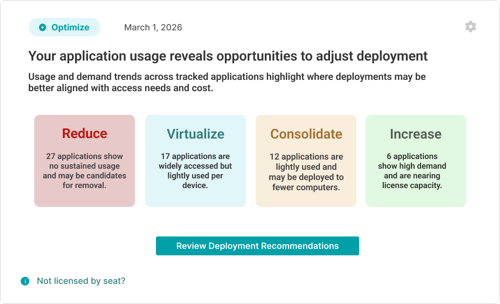
Application Deployment Optimization Insight
How this connects to LabStats Insights
The Application Deployment Optimization Insight is part of the wider LabStats Insights experience.
LabStats Insights helps surface automated reports, alerts, and recommendations inside the Insights Feed, giving you a clearer way to understand what needs attention across devices, software, usage, and health.
If you are new to LabStats Insights, start with From Insight to Action: A Guide to LabStats Insights for a broader overview of how the Insights Feed works and how individual Insights help turn campus IT data into clearer next steps.
You may also find these related resources helpful:
- Why Inventory Accuracy Matters, for understanding how group assignments support better reporting and software deployment analysis.
- The Hidden Cost of Inactive Computers, for understanding how devices that stop checking in can affect visibility, planning, and operational confidence.
- LabStats Hardware Management, for understanding how LabStats supports endpoint visibility and hardware tracking across campus.
- Optimize Labs & Learning Spaces, for guidance on using LabStats data to understand device usage, underused resources, and student access.
See LabStats Insights in action
Software deployment is one example of a wider challenge: important signals can be easy to miss when they are spread across applications, devices, groups, reports, and licensing conversations.
In our webinar, From Insight to Action: How Higher Ed IT Can Move from Reporting to Proactive Decisions, we explore how LabStats Insights helps surface those signals through the Insights Feed.
Watch on demand to see how LabStats Insights can help you identify what needs attention across devices, software, usage, and health.
Get Started
Software deployment decisions should not depend on assumptions alone.
The Application Deployment Optimization Insight helps bring usage and deployment patterns into view, giving you a clearer way to review applications, reduce waste, improve access, and align software decisions with real demand.
To see how LabStats Insights can support your institution, get started by booking a demo.
Work With Us
LabStats specializes in helping IT leaders reduce spend and get their budgets right.
