


Why Inventory Accuracy Matters
August 17, 2026 | LabStats Insights
5 min
Accurate inventory data is easy to overlook until something depends on it.
A report needs to show computer usage by lab. A planning conversation needs reliable device counts by location. A support team needs to understand where machines belong. A department wants to know whether its shared spaces are being used effectively.
Suddenly, the way computers are organized is not just an administrative detail. It becomes the foundation for confident decision-making.
That is why unassigned computers matter.
When computers are not assigned to the right groups, it becomes harder to understand where devices belong, how they are being used, and whether reporting reflects the reality of your environment. A few unassigned devices may not seem urgent, but over time they can create confusion, weaken reporting accuracy, and make planning more difficult.
For colleges and universities managing labs, libraries, classrooms, and shared learning spaces, inventory accuracy is more than housekeeping. It is what helps turn device data into something meaningful.
Why Inventory Accuracy Matters in Higher Education
Higher education technology environments are rarely simple.
Devices may be spread across multiple campuses, buildings, labs, classrooms, libraries, departments, and shared spaces. Some computers may be tied to specific academic programs. Others may support general student access. Some spaces may be heavily used during peak periods, while others may see demand shift throughout the term.
To make sense of that environment, device data needs structure.
Accurate inventory helps connect each computer to the context around it. That might mean its location, lab, classroom, department, campus, or function. Without that context, it becomes harder to turn raw device data into useful reporting.
Good inventory accuracy helps answer practical questions such as:
- Which labs have the highest computer usage?
- Which spaces have underused devices?
- Which groups need more resources?
- Which areas may be over-provisioned?
- Which devices should be included in a specific report?
- Which locations need follow-up before a planning or budget conversation?
Inventory accuracy also supports broader IT asset management principles. CIS guidance on enterprise asset inventory emphasizes the need to actively manage, inventory, track, and correct assets so organizations know what exists and what needs to be monitored. NIST guidance on IT asset management similarly reinforces the value of understanding assets, their locations, and their relationship to the wider environment.
For higher education, that visibility is essential because device usage is closely tied to student access, software availability, classroom readiness, and resource planning.
How Unassigned Computers Affect Reporting and Planning
Unassigned computers can make reporting less reliable because they sit outside the structure used to interpret usage.
If a computer is not assigned to the right group, it may not appear where you expect it. It may be harder to include in location-based analysis. It may create inconsistencies in reports that depend on group structure. It may also make it more difficult to compare usage between labs, departments, or spaces.
That can affect planning in several ways.
A lab may appear to have fewer devices than it really does. A group-level usage report may not tell the full story. Devices may be missed during review. Technology investments may be evaluated using incomplete information. Support teams may spend extra time confirming where machines belong before they can act.
The more distributed the environment, the more important this becomes.
In a small environment, unassigned devices may be easy to spot. In a large institution, they can disappear into the background.
That is why inventory accuracy should not only be checked during major audits or refresh projects. It should be part of ongoing operational hygiene.

What is an Unassigned Computer?
An unassigned computer is a device that has reported into LabStats but has not yet been placed into a group.
Groups help organize computers in a way that reflects the structure of your institution. That might mean grouping devices by lab, classroom, building, department, campus, use case, or another structure that supports reporting and management.
When a computer is unassigned, it exists in the system, but it is not yet connected to the group structure that gives it context.
That context matters.
A device without a group may be visible, but it is harder to understand where it belongs, what it should be compared against, or how it should be included in reporting. It is the difference between knowing a computer exists and knowing how that computer fits into your environment.
Why Do Computers Become Unassigned?
Computers often become unassigned when they are first added to a system.
This can happen during installation, hardware refreshes, lab changes, new device rollouts, imaging projects, or other moments when computers start reporting before they have been fully organized.
In a busy campus environment, this is not unusual. Devices are added, moved, replaced, renamed, refreshed, and repurposed throughout the year. New machines may report into LabStats before they have been placed into the correct group. Existing devices may require review after changes to locations, naming conventions, or reporting structures.
The issue is not that a computer appears unassigned. That can be part of the normal setup process.
The issue is when unassigned devices remain unassigned for too long.
That is when small data gaps can turn into larger reporting and planning problems.
How to Identify Unassigned Computers
To identify unassigned computers, you need a clear way to find devices that have reported into your environment but are not connected to the right group.
Useful signals include:
- Whether the computer has been assigned to a group
- When the device first reported into the system
- Whether it belongs to a known lab, room, department, or location
- Whether it was recently added, refreshed, renamed, or moved
- Whether naming conventions can help determine where it belongs
- Whether similar devices are already assigned correctly
- Whether the device should be grouped for reporting, management, or follow-up
The goal is not just to find unassigned devices. It is to place them into the structure that makes reporting more accurate and useful.
That may mean assigning a device to a lab group, moving it into the correct location, organizing it under a department, or validating that the current grouping structure still reflects how the environment is managed.
What Should You Do When You Find Unassigned Computers?
Once unassigned computers are identified, the next step is to complete the missing context.
Common actions include:
- Reviewing the list of unassigned computers
- Determining which group each computer belongs to
- Assigning computers to the appropriate groups
- Validating naming conventions or location details
- Checking whether the device is new, moved, replaced, or incorrectly configured
- Reviewing whether group structures still match the way spaces are managed
The best action depends on why the device is unassigned.
A newly added computer may simply need to be placed into the correct group. A moved device may need to be reassigned. A device with an unclear name may need additional investigation. A wider pattern of unassigned computers may point to a process gap during setup, deployment, or refresh activity.
Completing these assignments helps keep your LabStats environment organized and helps ensure that reporting reflects the way your institution actually operates.

How LabStats Unassigned Computers Insight Helps
The Unassigned Computers Insight helps identify computers in LabStats that have not yet been assigned to a group.
Instead of manually searching for devices that are missing group assignments, the Insight brings the issue forward in the Insights Feed when unassigned computers exist. It helps show the scale of the problem and gives you a direct path to complete the assignment process.
When you select Complete group assignments, LabStats opens Computer Manager filtered to show only unassigned computers and sorted by name. From there, you can review the list and assign computers to the appropriate groups.
The Unassigned Computers Insight can help answer practical questions such as:
- Which computers still need to be assigned to a group?
- Are new devices being organized correctly after setup?
- Are any devices missing from the reporting structure?
- Do group assignments reflect the way labs, classrooms, or shared spaces are actually managed?
- Is there a process gap causing computers to remain unassigned?
The Insight can also support notification workflows. When unassigned computers are detected, users can receive emails according to their selected notification schedule. If no unassigned computers exist, no email is sent.
The value is simple: unassigned computers become easier to find, review, and organize before they create wider reporting confusion.
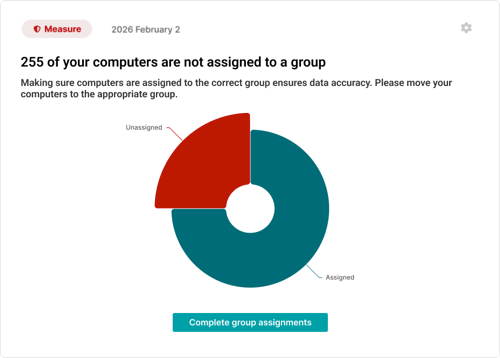
Unassigned Computers Insight
How this connects to LabStats Insights
The Unassigned Computers Insight is part of the wider LabStats Insights experience.
LabStats Insights helps surface automated reports, alerts, and recommendations inside the Insights Feed, giving you a clearer way to understand what needs attention across devices, software, usage, and health.
If you are new to LabStats Insights, start with From Insight to Action: A Guide to LabStats Insights for a broader overview of how the Insights Feed works and how individual Insights help turn campus IT data into clearer next steps.
You may also find these related resources helpful:
- The Hidden Cost of Inactive Computers, for understanding how devices that stop checking in can affect visibility, planning, and operational confidence.
- LabStats Hardware Management, for understanding how LabStats supports endpoint visibility and hardware tracking across campus.
- Optimize Labs & Learning Spaces, for guidance on using LabStats data to understand device usage, underused resources, and student access.
See LabStats Insights in action
Unassigned computers are one example of a wider challenge: important signals can be easy to miss when they are spread across many devices, groups, reports, and locations.
In our webinar, From Insight to Action: How Higher Ed IT Can Move from Reporting to Proactive Decisions, we explore how LabStats Insights helps surface those signals through the Insights Feed.
Watch on demand to see how LabStats Insights can help you identify what needs attention across devices, software, usage, and health.
Get Started
Unassigned computers can quietly weaken reporting accuracy and make it harder to trust the data behind planning decisions.
The Unassigned Computers Insight helps bring those devices into view, giving you a clearer way to organize your environment and improve reporting confidence.
To see how LabStats Insights can support your institution, get started by booking a demo.
Work With Us
LabStats specializes in helping IT leaders reduce spend and get their budgets right.
